
Download Proposalgenie – AI‑Powered Proposal Creation for Freelancers
Overview
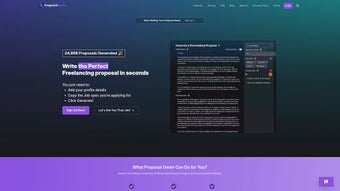
Freelancers and small business owners constantly battle the time‑intensive process of writing proposals that stand out on platforms such as Upwork, Fiverr, and Freelancer.com. Proposalgenie steps into that gap as a web‑based AI writing assistant purpose‑built for the gig‑economy. By feeding the tool with a job posting’s requirements and a snapshot of your personal profile—skills, experience, rates, and past successes—Proposalgenie instantly crafts a customized, compelling proposal that mirrors the client’s language while highlighting the unique value you bring.
The platform is more than just a text generator. It offers a clean dashboard where you can track generated proposals, edit them in real‑time, and store reusable templates for future gigs. An “expert feedback” module lets you send drafts to seasoned freelancers for a quick sanity check, while the AI continuously learns from successful bids, refining its suggestions over time. The result is a streamlined workflow that reduces the average proposal‑writing time from 30‑45 minutes to under five minutes, freeing you to focus on delivering the actual work.
From a security standpoint, Proposalgenie runs entirely in the browser, meaning your data never leaves your machine unless you explicitly save it to the cloud. The service is offered under a freemium model: a generous free tier that supports unlimited basic proposals, and a paid Pro plan that unlocks premium templates, priority AI processing, and deeper analytics. Whether you’re a seasoned consultant looking to scale or a newcomer trying to break into the market, Proposalgenie promises a faster, smarter, and more professional way to win jobs.
Key Features, Pros & Cons
- AI‑Driven Drafting: Generates full‑sentence proposals based on job description and user profile.
- Customizable Templates: Save, edit, and reuse templates tailored to specific niches.
- Expert Feedback Loop: Invite experienced freelancers to review drafts within the platform.
- Skill Database Integration: Access a curated library of over 5,000 skill descriptors and industry buzzwords.
- Real‑Time Editing: Inline editor with grammar, tone, and keyword suggestions.
- Analytics Dashboard: Track proposal acceptance rates, response times, and AI confidence scores.
- Secure Cloud Sync: Optional encrypted storage for drafts and templates.
- Multilingual Support: Generates proposals in English, Spanish, French, and German.
Pros
- Drastically reduces time spent on proposal writing.
- AI adapts to your personal voice, preserving authenticity.
- Free tier is fully functional for occasional freelancers.
- Built‑in feedback system improves proposal quality without extra cost.
- Browser‑only operation eliminates the need for installations.
- Transparent pricing and no hidden fees.
Cons
- Advanced analytics are locked behind the Pro subscription.
- AI may occasionally over‑optimize language, sounding too formal.
- Internet connection required for real‑time generation.
- Limited to the major freelance marketplaces; niche job boards need manual input.
Installation, Usage, Compatibility & FAQ
Installation & Setup
- Visit proposalgenie.com and click “Sign Up – Free”.
- Enter your email, create a strong password, and verify your account through the confirmation link.
- Complete the onboarding questionnaire: upload a résumé, list top skills, and set your hourly or fixed rates.
- Choose a default template or let the AI suggest one based on your profile.
- Once the dashboard loads, you’re ready to start generating proposals instantly—no software download required.
How to Use Proposalgenie Effectively
- Copy the job posting: Paste the description into the “Job Details” field. The AI parses keywords, required deliverables, and client tone.
- Select a template: Pick a pre‑made template that matches the project type (e.g., “Web Development”, “Content Writing”).
- Generate draft: Click “Create Proposal”. Within seconds, the AI produces a full proposal, highlighting how your experience meets each requirement.
- Fine‑tune: Use the inline editor to adjust language, add personal anecdotes, or insert portfolio links.
- Request feedback (optional): Click “Ask an Expert” to send the draft to a vetted freelancer for quick suggestions.
- Export or copy: Download as PDF, copy to clipboard, or push directly to Upwork via the “One‑Click Submit” button (available for Pro users).
Compatibility
Proposalgenie is a cloud‑native SaaS platform, meaning it works on any device with a modern web browser. Officially supported browsers include Chrome, Firefox, Edge, and Safari on Windows 10/11, macOS Ventura and later, Linux distributions, as well as mobile browsers on Android 12+ and iOS 15+. No additional plugins or extensions are required, and the service complies with GDPR and CCPA for data privacy.
Frequently Asked Questions
Is Proposalgenie truly free to use?
Yes. The free tier provides unlimited basic proposals, access to the core AI engine, and standard templates. A paid Pro plan unlocks premium features like advanced analytics, priority AI processing, and one‑click marketplace integration.
Can I use Proposalgenie on my mobile phone?
Absolutely. Because the tool runs entirely in the browser, you can access it from any smartphone or tablet with a modern browser. The responsive UI adjusts for smaller screens, and all core functions—including AI generation and editing—are available on mobile.
How does the AI protect my personal data?
Proposalgenie processes your data locally in the browser before sending minimal, anonymized snippets to the AI server for generation. All stored drafts are encrypted at rest, and you control whether to enable cloud sync. The platform adheres to GDPR and does not sell your information.
What happens if the AI suggests a proposal that doesn’t match my style?
The generated draft is fully editable. You can tweak tone, replace phrases, or delete sections. Over time, the AI learns from the edits you make, gradually aligning its suggestions with your preferred voice.
Is there a limit on the number of proposals I can generate per month?
The free plan has a generous limit of 200 proposals per month, which is sufficient for most freelancers. Pro subscribers enjoy unlimited generation and faster response times.
Conclusion & Call to Action
In a marketplace where speed, relevance, and professionalism dictate success, Proposalgenie offers a decisive advantage. By automating the repetitive aspects of proposal writing while preserving the personal touch that wins clients, the platform empowers freelancers to bid on more projects without sacrificing quality. Its browser‑based architecture guarantees that you can work from any device—whether you’re in a coworking space, a coffee shop, or on the go. The free tier provides ample functionality for newcomers, and the affordable Pro upgrade scales with growing businesses.
Ready to stop staring at a blank proposal window and start winning gigs? Sign up for Proposalgenie today, generate your first AI‑crafted proposal in minutes, and experience the productivity boost that thousands of freelancers already trust.
Proposalgenie delivers a fast, reliable, and surprisingly human‑like proposal drafting experience. The AI respects my personal voice after a few edits, and the built‑in feedback feature has helped me refine pitches that previously fell flat. The only drawback is that some of the deeper analytics are locked behind the Pro plan, but for most freelancers the free tier is more than enough.



.png)



